
Most logo mats start from a file pulled out of an old email. That is fine: our designers rescue low-resolution logos every day. But a little care with the artwork gives a sharper mat and a faster proof. This guide covers what to send, what prints well in carpet pile, and how the proofing process works from upload to delivery.
Which file should I send?
In order of preference:
- Vector: SVG, PDF, AI or EPS. Scales to any size with no loss. Your sign maker, printer or brand agency will have one.
- High-resolution PNG with a transparent background. 1,000 pixels wide or more is fine for most logos; 2,000 is better for a large mat.
- JPG. Works, but has no transparency, so the white box has to be removed. The designer does this automatically on upload and our artwork team tidies the edges.
- A screenshot or a logo copied from a website. Usually too small, but send it anyway. We can often redraw a simple logo as part of the free proof, and we tell you if we cannot.
Upload limit is 20 MB. If you have both a vector file and a PNG, send the vector.
What prints well in carpet pile
A mat is printed into a 6 mm (indoor) or 7 mm (outdoor) textile pile, not onto paper. The pile softens very fine detail, so design for it:
- Text: keep lettering at least 2 cm high indoors and 3 cm outdoors. Thin serifs and condensed fonts soften first; bold sans-serif fonts hold up best.
- Lines: keep outlines and rules at least 3 mm wide indoors, 4 mm outdoors. We thicken fine outlines where we can without changing the look of the logo.
- Drop shadows, glows and blur: avoid them. They turn into a smudge in pile.
- Small detail in a crest or badge: simplify or enlarge it. A crest that works at 2 cm on a letterhead needs to be 30 cm or more on a mat.
- Edges: keep logos and wording at least 5 cm inside the edge of the mat. The background colour prints edge to edge; the designer shows the safe area.
Logo size and position
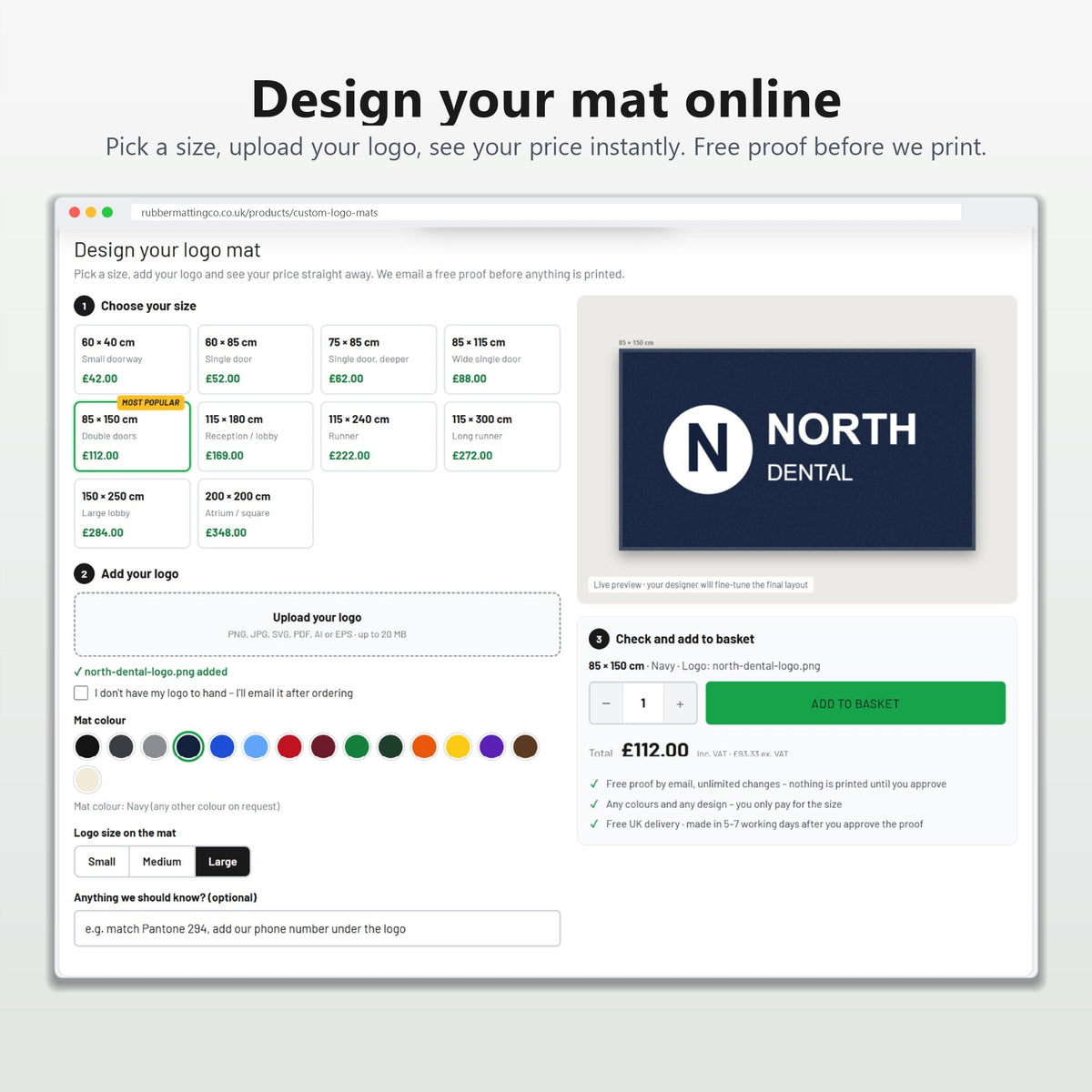
In the designer, choose Small, Medium or Large for the logo and drag it anywhere on the preview. As a rule, a logo at 50 to 60% of the mat width reads well from standing height. Centred is the default; a logo at one end with wording across the middle, or a logo repeated along a runner, are both common. Portrait or landscape costs the same and changes only which way the design reads, so set it the way people approach the door.
Text, QR codes, handles and sponsors
- Text: use the text tool to add a name, phone number, web address or message in Bold, Classic, Condensed or Light, in any colour, and drag it into place.
- QR codes: print them at least 15 cm square indoors and 20 cm outdoors, on a plain background with strong contrast, and test the proof with your phone before approving.
- Social handles and icons: add the handle as text or upload the icons with your logo. No extra charge.
- Sponsors and partner logos: upload the main logo, mention the second one in the notes or email it after ordering, and we place it on the proof. Any number of logos and colours is included.
Colour
Give Pantone or HEX references wherever you can; a HEX code previews on the mat immediately and a Pantone reference is confirmed on the proof. Artwork in CMYK is converted for you. Metallic foils are matched to their nearest solid tone. Our colour guide covers which backgrounds hide dirt and how to keep a logo readable.
How the proofing process works
- Preview as you design. The on-page preview shows your size, colour and logo position instantly and needs no sign-up. Use Email me this design to save a link and come back later.
- Order. Add the mat to your basket and check out. If you do not have the logo to hand, tick the box and email it afterwards.
- Designer check. A person opens your artwork, removes backgrounds, thickens fine lines, checks the size and colours, and builds a print-ready proof.
- Proof by email within one working day. It shows the exact finished size, colours and layout, and notes anything the designer changed and why.
- Revisions, unlimited and free. Reply with changes and a new proof follows. We never print without your written approval, and an order with an unanswered proof is held, not cancelled.
- Approve and print. Your lead time starts when you approve: 3 to 4 working days for indoor and outdoor mats. We keep the approved artwork on file so reorders and new sizes need no new proof from scratch.
Common artwork problems and what we do about them
| Problem | What happens |
|---|---|
| White box around the logo | Removed automatically on upload; edges tidied by hand before the proof |
| Pixelated, low-resolution logo | Redrawn or cleaned up where possible; you see the result on the proof |
| Text too small to print cleanly | Enlarged or thickened on the proof and flagged to you |
| Colours supplied as CMYK or RGB | Converted and confirmed on the proof; add Pantone or HEX if you have them |
| Logo too close to the edge | Moved inside the safe area, or the mat size increased on request |
| No logo file at all | Describe what you want in the notes; simple typographic designs are set out on the proof at no charge |
Quick answers
Do I pay more for a complicated logo?
No. Pricing is by size only. Full colour, gradients, photographs and several logos all cost the same.
Can you design the mat for me?
Yes. Tick I don't have my logo to hand, add your wording and colours, and describe it in the notes. Our designer sets it out on the proof.
Can I reorder in a different size later?
Yes. The design is printed rather than woven, so the same artwork scales to any size from 40 × 40 cm up to 200 × 650 cm, and we re-proof it at the new size.
Try it now: open the logo mat designer, upload what you have and see the mat and the price straight away.


